Vba Font Color Codes
Vb color is the easiest way to set colors in vba. To set a color code using vbcolor use the table below:

How To Change Font Color For Part Of Text By Vba Excel Magus
Range (a1).font.color = rgb (255, 0, 0) explanation:

Vba font color codes. We will discuss these below: The wdbyauthor constant is not a valid color for fonts. If you don't know how to work with the vbe, i suggest you read my visual basic editor (vbe) tutorial.
We will discuss a few of the most common properties below. Private sub worksheet_beforedoubleclick(byval target as range, cancel as boolean) cancel = true if target.interior.colorindex = xlnone then Rgb stands for red, green and blue.
Vba offers an rgb function to convert a mix of rgb values to the decimal code of a color, making it useful to assign an rgb mix to any color property. How do i modify this code to also change the font to bold white? Let’s set the font color of cell a1:
Xlrange.font.color = 16777164 (equivalent to: 'rate you wish to lighten (darken) shaderate = 50 'i recommend 50 or 25 (make negative to darken) 'store activecell to a variable. There are two different ways that we can set the color:
Font colors in excel vba. Sub testme() worksheets(1).cells(1, a).interior.color = vbyellow debug.print hex(worksheets(1).cells(1, a).interior.color) 'ffff debug.print worksheets(1).cells(1, a).interior.color '65535 dim hexcolor as string hexcolor = right(000000 & hex(worksheets(1).cells(1, a).interior.color), 6) debug.print hextorgb(hexcolor) 'ffff00. Place your cursor on vbred in the visual basic editor and click f1 to see which other constants you can use.
Activecell.borders.color = rgb(255, 0, 0) activecell.borders(xltop).color = rgb(0, 0, 255) activecell.borders(xlbottom).colorindex = 18 activecell.font.colorindex = 17 activecell.font.color = rgb(255, 0, 0) selection.interior.colorindex = xlnone 'xlcolorindexautomatic or xlcolorindexnone selection.interior.colorindex = 5. Charts (chart1).axes (xlvalue).ticklabels.font.color = _ rgb (0, 255, 0) After adding font., we get this result:.
Let's start by assigning a color to the text in a1. Vba font color property is used to change the font color of excel cells using vba code. I have some basic code below to automatically highlight a row a predetermined cell color after a double click.
Sub color() range(b2).font.color = rgb(153, 50, 204) end sub once done, run the code using the f5 key or manually. In that case charles' solution should work but here is another option: There is a total of eight constants that you can use:
In the example below when the user presses the run button a color dialog will open prompting the user to select a color.the color of the font in cell a1 will change to the selected color:. Here you can see the 56 colors that are available through colorindex:. We will see, the color of the text in cell b2 will now be changed to purple color shade.
Range(a1).font.color = rgb(68,247,255) you can use excel to choose a color you like from the color selection dialog box to see its rgb values. Colorindex, which has 56 colors, or color which makes it possible to use any color at all. Hexcolor = right (000000 & hex (cell.interior.color), 6) 'determine current rgb color code.
However, it’s also the least flexible. We can set the font colors in excel vba using colorindex property of font object. Sub checkbox1_click () with range (a1:b3) if checkbox1.value then.font.color = vbwhite.interior.color = vbblack else.font.color = vbblack.interior.color = vbwhite end if end with end sub.
The color property takes two input types: To set the color of our text to one of these 56, we should write: In vba, you can change font properties using the vba font property of the range object.
Type the following code into the vba editor and you’ll see a list of all the options available: In the above code, after the font object, color is the property and you have used the vbred constant that tells vba to apply the red color to the cell a1. Private sub btnrun_click() 'the color code selected by the user dim intcolorcode as long 'displays the color dialog.
Here's another approach using colorindex. So for this go to the vba window and click on module option available in the insert menu option as shown below. Set cell a1 font color to red.
The vba code in the excel workbook that accompanies this excel vba userform text box font color tutorial is (always) stored in the visual basic editor (vbe). Colorindex 48) xlrange.borders.color = rgb(150,0,0) (equivalent to colorindex 3) xlrange.characters(1, 2).font.color = 6 (equivalent to: A variable that represents a font object.
The simplest way to apply color is using the vb color name, you don’t have to remember which number represents which color, the the color for your choice is very limited. When i prepare a dashboard in excel prepare a dashboard in excel the excel dashboard is an enhanced form of data visualization that. Returns or sets a wdcolorindex constant that represents the color for the specified font.
The following code line gives the exact same result. Example 1, set font color: This example changes the color of the text in the first paragraph in the active document.
If statement based on font colour. Sub setfontcolorindex_range() range(a1:e20).font.colorindex = 40 end sub Instead of using excel / vba’s colorindex property, you can use the color property.
We can change the color of the font in multiple ways using color index, color property with rgb function. Here is the simple excel vba font color macro to set the font color of a given range a1:e20.

Rgb Colour Codes Cheat Sheet Coding Web Design Rgb Color Codes

Vba Code That Will Sum Cells By Its Color Through Excel Function Excel Tutorials Ms Excel Tutorials Excel Functions

Have Excel Vba Find A Value Based On A Userform Entry Excel Tutorials Microsoft Excel Tutorial Excel
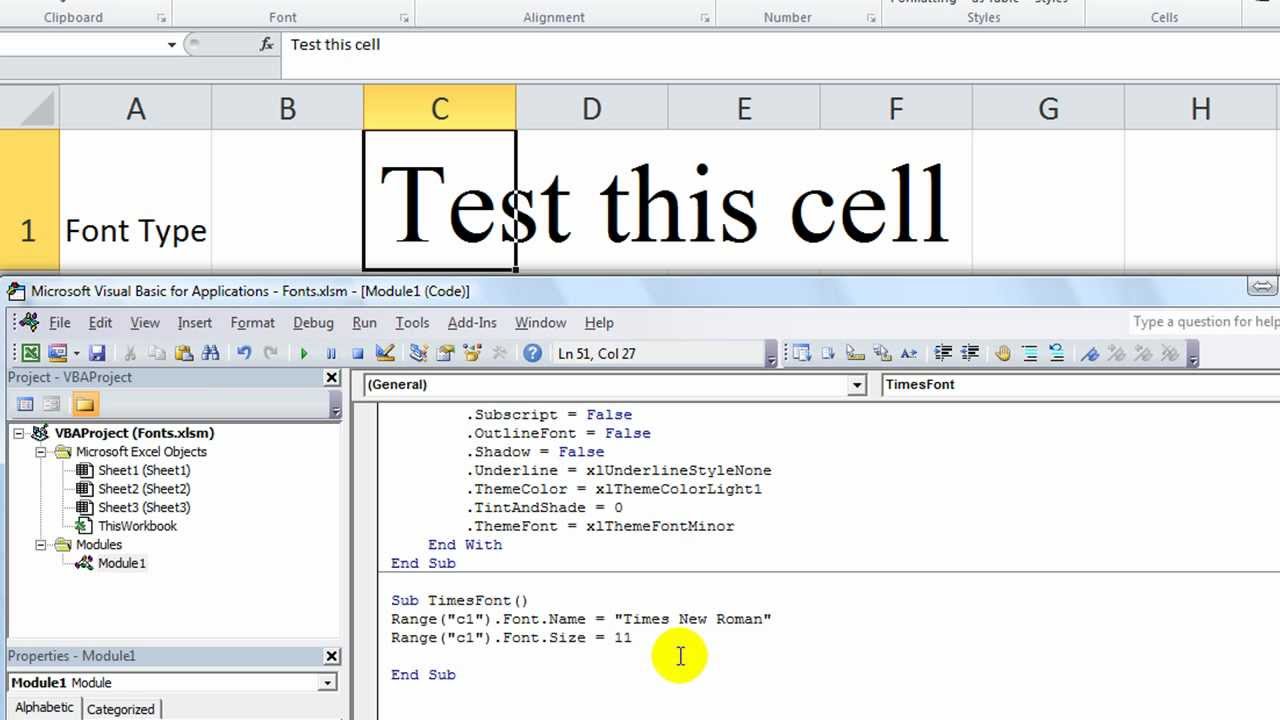
Excel Vba Basics 18 - Change The Font Type Size Etc Using Vba Excel Shortcuts Technology Lessons Excel

Change Font Color Of Partial Text In A Cell With Vba - Excelinator Excel Tutorials Text Excel

How To Show The Developer Tab In Excel Excelsupersite Excel Development Microsoft Excel

Excel Vba Game To Reveal Colors Or Couples A Beautiful Game Created With Excel Vba Code Reveal Colors Andor Couples To Find P Excel Tutorials Excel Coding

Vba Code Example Excel Tutorials Coding Excel Macros

How To Get Rgb Codes Of A Color Excelsirji Coding Rgb Color Picker Rgb Color Codes

Count The Number Of Cells With Specific Cell Color By Using Vba - Office Microsoft Excel Formulas Color Coding Cell

Adding Color To Excel 2007 Worksheets By Using The Colorindex Property Color Coding Coding Excel Tutorials

Excelsirji Vba Code To Count Color Cells With Conditional Formatting Excel Tutorials Coding Cell

The Developerworks Color Palette Including Rgb Values For Each Color Color Color Coding Art Theory
Excel Vba Colors Color Coding Color Coding

Cheat Sheets Close To My Heart Color Palette Design Coding

Pin On Color Codes

Pin On Vba

Vba Code To Change Cell Background Color - Complete Excel Tutorial In 2021 Excel Tutorials Color Coding

Vba Code To Change Cell Background Color - Complete Excel Tutorial In 2021 Excel Tutorials Coding Excel Spreadsheets


Komentar
Posting Komentar