How To Change Font On Kindle 10
Also i remember the fonts not being retina ready at the time ipad 3 came out so it is possible that amazon uses their own. You should be able to achieve the same thing.
How To Change The Font Size On Your Kindle In 2 Ways
I've read about a method for android (all these apps apparently use system fonts) but i haven't found a way to do any changes to them on the ipad.
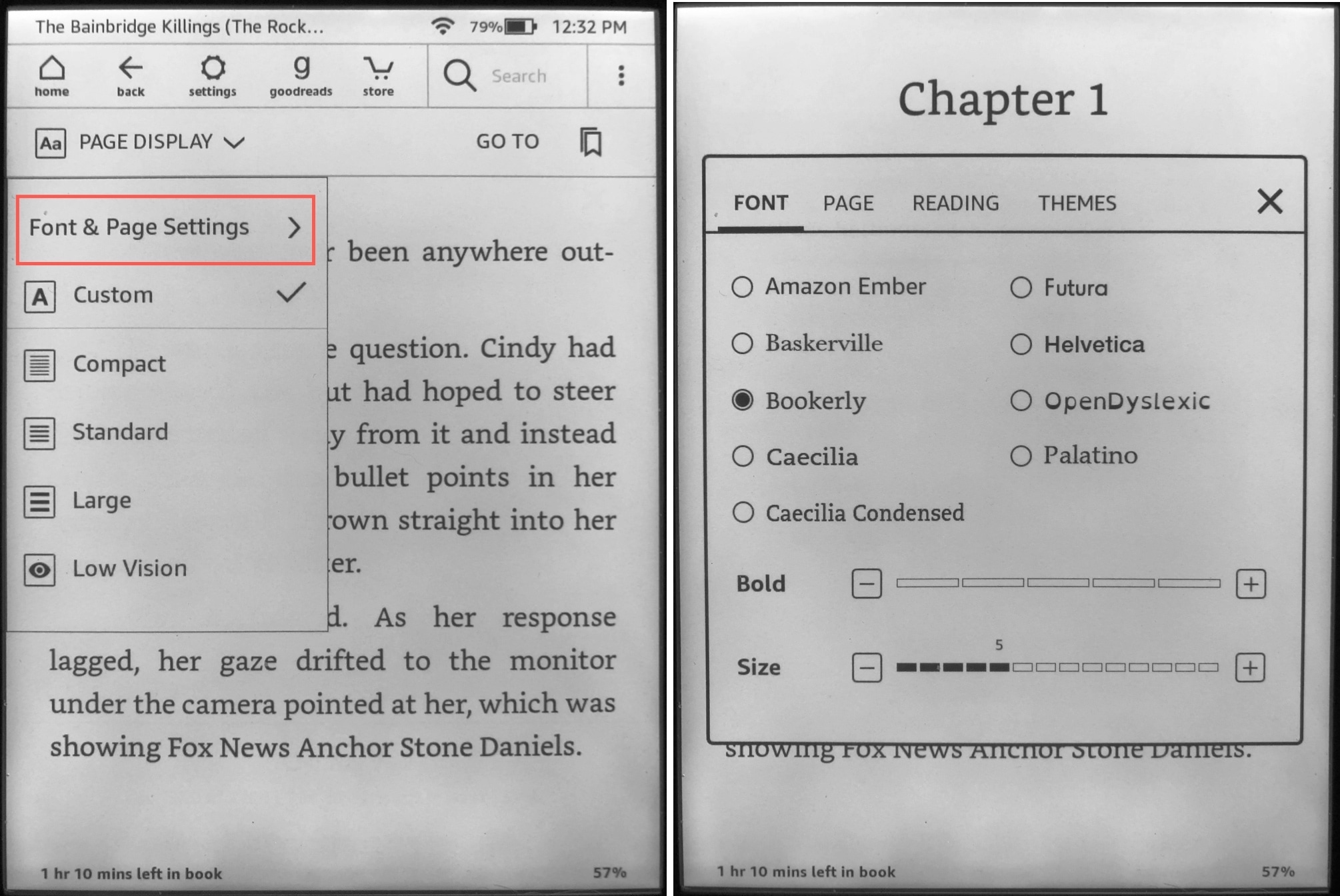
How to change font on kindle 10. So in this article i am going to introduce top 10 custom fonts for you. Press the “menu” button at the bottom. Change the font on kindle paperwhite.
Open a book on your kindle to adjust the font size and style. If everything went the way it should you will find a new custom option setting in the kindle’s font selection screen. Open a book on your kindle to adjust the font size and style.
1) tap the top of the screen to display the menu. Change the font on kindle paperwhite. Whenever i try to change the font size on the kindle 10th gen (not paperwhite) by pinching the screen, the dialog box appears as usual showing me the levels of the font size that i can adjust.
3) tap font & page settings. You'll want to select the font option. Select aa to change your font style.step 3, select “font”.
Disconnect your kindle from the computer. If you’re looking to mix it up with something more distinct, you can do so by swapping out the fonts in the \linkfonts\fonts\ folder. Then disconnect your kindle from the computer.
Inspired by the artistry of print books and powered by our enhanced typesetting engine, kindle page layouts are designed to make reading enjoyable for everyone. The original way to change font size. This is the traditional way to adjust the font.
If the font is packaged into a compressed file (such as a zip file), uncompress the files using your favorite file extracting program. Out of curiosity, i decided to take a look at a helvetica font in size 2. Adjust the text to the size you desire or switch fonts completely (caecilia is slightly larger and easier to read than futura, for example, and helvetica is bolder).
Kindle reading customization and enhanced typesetting. If playback doesn't begin shortly, try restarting your device. This means we add fonts to kindle successfully!
The kindle should automatically detect all compatible fonts and display them for you to. Is there any way to do this, change the standard font in kindle for ios. You can also adjust the.
How to install fonts on your kindle: Once you've decided, tap on that book.step 2, tap on the top of your screen. How to change pdf font size on kindle paperwhite.
Adjust to the size you desire. Tap the top of the screen. A bunch of different options should pop up.
Tap the “+” sign on the bar next to it to increase the font size. 4) make sure the font tab is selected at the top. On the standard kindle, you can choose from six different font sizes, and you can select fonts like helvetica and futura.
I could actually read it! You can increase the font size up to “3.” note: Any changes you make will apply to other books you open as well.
You’ll need to tap the “font size” option on some kindle fire devices. As someone who has visual problems, i've been astonished by the size 2 reading fonts mentioned here. I am forced to restart the device.
Find the fonts folder and copy and paste the font file you downloaded in there. Copy the font files into the “fonts” folder on your kindle. Amazon kindle for pc has just been updated to version 1.23 and it brings a slew of new features, including two column mode, split screen mode and formula mode for.
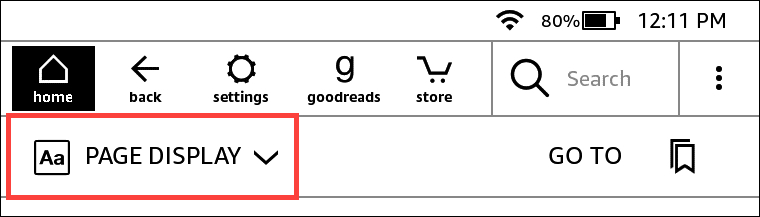
Select a different size aa at the top to make text larger or smaller. Without a doubt, baskerville is the most heavily used font by. 2) select the aa (page display) button.
When you click “aa”, there will be more options for you to choose from. On a kindle paperwhite, you can change. Baskerville is a serif typeface increased the contrast between thick and thin strokes,which created a greater consistency in size and form.
Pick up your kindle, open an ebook, and select the “font & page settings” menu. Select it to change the font type. Step 1, decide which book you want to change the font style of.
You can now choose a custom font in addition to the kindle fonts from the display settings (aa) menu If playback doesn't begin shortly, try restarting your device. It's exactly the font we just embed.
And, because every reader has unique preferences, kindle lets you customize your text size, font type, margins, and more. But once i'm done, i am not able to refresh the screen to continue reading the book. By default, the font changes aren’t super dramatic.
You can also adjust the font, line spacing, and margins. Select the “aa” graphic, which is the text size key. Tap the top of the screen;
Then disconnect your kindle from the. This graphic will help you both change your font size and the font itself. The fonts included in the font pack are intended to subtly improve the default kindle fonts.

10 Best Psychology Books Psychology Books Behavior Books Brain Book

Fintie Case For All-new Amazon Fire Hd 10 And Fire Hd 10 Plus Tablet Only Compatible With 11 In 2021 Fire Hd 10 Tablet Amazon Fire Tablet
How To Change The Font Size And Style On Kindle Paperwhite

Pin On Sabrina Anne Nelson

Change The Worlds Understanding 10 3 Mdgc Book Book 7 By Tito Sapetin Kindle Reading Understanding Books
How To Change The Font Size And Style On Kindle Paperwhite
How To Change The Font Size On Your Kindle In 2 Ways

Pin On Kingsumo Giveaways

Is The Show Over For Echo Show Tablet Fire Hd 10 Fire Tablet

Pin On Must Reads

Dyslexic Help While Reading On A Kindle Select The Font Option And Change To The Largest Font And Line Spacing My Struggling 10 Year Words Dyslexia Dyslexics

Kindle Project Projects 10 Things Kindle

Method 10 To Grow On Instagram Grow Like A Boss On Instagram Start Gaining More Followers Instagram Growth Kindle Reading More Followers

Pin On Newsnoticias

Ccccccccxxxxxx Kindle Fire Tablet Kindle Fire Hd Amazon Kindle Fire

How To Change Computer Fonts In Windows 7 How To Change Computer Font Style In Hindi Betechnical Computer Font Hacking Computer New Fonts

Amazon Kindle Fire Hd10 Tablet - How To Setup H2techvideos Kindle Fire Tablet Amazon Fire Tablet Amazon Kindle Fire
How To Change The Font Size On Your Kindle In 2 Ways
How To Change The Font Size On Your Kindle In 2 Ways


Komentar
Posting Komentar